Overview
What SQLite Browser is, what it can do, and how it is built.
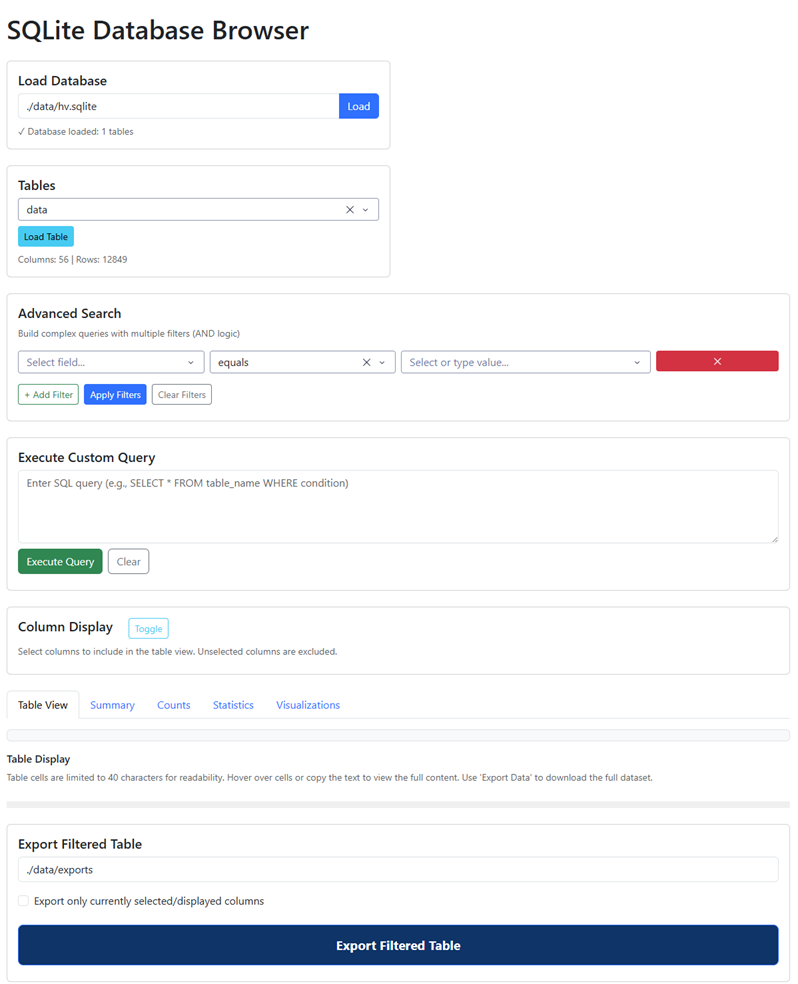
SQLite Browser is a Python web application for loading, querying, and visualizing SQLite databases — no SQL expertise required. It runs entirely on your own machine and is accessed through any web browser at http://127.0.0.1:8050.
It is built on Plotly Dash and managed with uv.
Features
| Feature | Description |
|---|---|
| Database Loading | Load any SQLite .sqlite file by path |
| Table Browser | View all tables with column names and row counts |
| Advanced Search | Visual filter builder with 11 operators — no SQL required |
| Custom SQL | Write and execute arbitrary SQL queries |
| Table View | Interactive paginated results with generated SQL shown for reference |
| Summary tab | Per-column data profile: missingness, unique values, top values, min/max, type |
| Counts tab | Categorical combination counts with configurable grouping, sort controls, treemap, and sunburst charts |
| Statistics tab | Descriptive statistics for numeric columns |
| Visualizations tab | Interactive histograms, bar charts, and scatter plots |
| Export | Download filtered results as a TSV file, SQL query included |
What it is not
SQLite Browser is a read-only tool. It cannot insert, update, or delete rows. It is designed for exploration and analysis, not database administration.