Creating an SQLite file from Parquet files
utilities/parquets2db.py collects one or more Parquet files, concatenates them into a single table, and writes the result to a SQLite file that can be opened directly in SQLite Browser. While it was originally built around bids2table outputs, it works with any Parquet files.
Sidecar metadata: bids2table v2 Parquet files don’t include JSON sidecar metadata. To include it, build the SQLite file directly from the BIDS dataset with bids2db.py.
Prerequisites
- SQLite Browser dependencies installed (
uv syncin the repo root) - One or more
.parquetfiles to convert
Usage
uv run python utilities/parquets2db.py PARQUET_GLOB -o SQLITE_FILE
| Argument | Required | Description |
|---|---|---|
PARQUET_GLOB | Yes | Python glob pattern matching all Parquet files to include |
-o / --output | Yes | Path for the output .sqlite file (must end in .sqlite) |
Step-by-step
1. Locate your Parquet files
Here is an example of how Parquet files might look on the filesystem:
 📂dsst_parquets
 ┣ 📂ds001553
 ┃ ┗ 📜part-20260319071158-0000-of-0001.parquet
 ┣ 📂ds001555
 ┃ ┗ 📜part-20260319071202-0000-of-0001.parquet
 ┣ 📂ds003466
 ┃ ┗ 📜part-20260319071204-0000-of-0001.parquet
 ┣ 📂ds004215
 ┃ ┗ 📜part-20260319071208-0000-of-0001.parquet
 ┣ 📂ds004605
 ┃ ┗ 📜part-20260319071216-0000-of-0001.parquet
 ┣ 📂ds004654
 ┃ ┗ 📜part-20260319071218-0000-of-0001.parquet
 ┣ 📂ds004730
 ┃ ┗ 📜part-20260319071220-0000-of-0001.parquet
 ┣ 📂ds004731
 ┃ ┗ 📜part-20260319071222-0000-of-0001.parquet
 ┣ 📂ds004733
 ┃ ┗ 📜part-20260319071225-0000-of-0001.parquet
 ┣ 📂ds004935
 ┃ ┗ 📜part-20260319071227-0000-of-0001.parquet
 ┣ 📂ds005112
 ┃ ┗ 📜part-20260319071229-0000-of-0001.parquet
 ┣ 📂ds005166
 ┃ ┗ 📜part-20260319071232-0000-of-0001.parquet
 ┣ 📂ds005521
 ┃ ┗ 📜part-20260319071234-0000-of-0001.parquet
 ┣ 📂ds005752
 ┃ ┗ 📜part-20260319071236-0000-of-0001.parquet
 ┣ 📂ds005754
 ┃ ┗ 📜part-20260319071244-0000-of-0001.parquet
 ┣ 📂ds005917
 ┃ ┗ 📜part-20260319071246-0000-of-0001.parquet
 ┣ 📂ds006267
 ┃ ┗ 📜part-20260319071248-0000-of-0001.parquet
 ┣ 📂ds006303
 ┃ ┗ 📜part-20260319071250-0000-of-0001.parquet
 ┣ 📂ds006577
 ┃ ┗ 📜part-20260319071253-0000-of-0001.parquet
 ┗ 📂ds007376
   ┗ 📜part-20260319071255-0000-of-0001.parquet
A glob pattern collecting these could look like:
/path/to/bids2table_output/dsst_parquets/ds*/*.parquet
2. Run the script
uv run python utilities/parquets2db.py \
    "/path/to/bids2table_output/dsst_parquets/ds*/*.parquet" \
    -o data/db.sqlite
The script prints each file as it is processed:
Processing part-20260319071158-0000-of-0001.parquet
Processing part-20260319071202-0000-of-0001.parquet
...
Successfully converted <glob> to db.sqlite
All matched Parquet files are read with pandas.read_parquet() and concatenated into a single DataFrame. The result is written to a table named data inside the SQLite file.
3. Verify the output
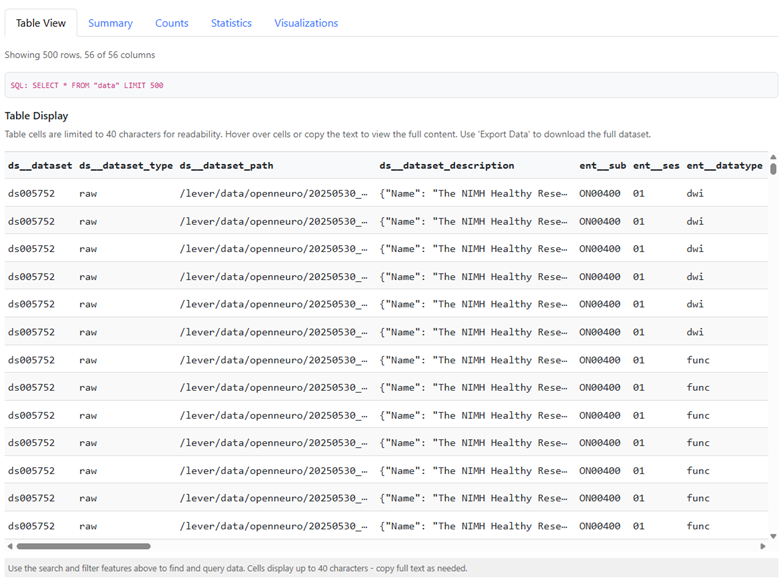
Open db.sqlite in SQLite Browser. You should see a data table with all rows from every matched Parquet file combined.
Notes
- The output file must have a
.sqliteextension; the script exits with an error otherwise. - If the output file already exists and is write-protected, the script exits without overwriting it.
- If no Parquet files are found for the glob pattern, the script exits with an error.
- Nested Parquet columns (struct, list, map) are stored as JSON text, since SQLite only supports scalar values.
- The glob pattern should usually be “quoted” in the shell to prevent the shell from expanding it before Python sees it.